Clicky

  • About
    • Affiliate Disclosure
    • Ballen Academy
    • Contact Us
    • Privacy Policy
    • Youtube
  • Loris Tools
  • Lori Ballen’s Blog
    • Affiliate Marketing Strategies
    • Blogging Strategies
    • Branding Strategies
    • Digital Products
    • Financial Freedom
    • Marketing Tools and Resources
Thursday, December 4, 2025
  • Login
❤️ Lori Ballen
No Result
View All Result
Ballen Blueprint Coaching
eBooks
Get a Website
  • About
    • Affiliate Disclosure
    • Ballen Academy
    • Contact Us
    • Privacy Policy
    • Youtube
  • Loris Tools
  • Lori Ballen’s Blog
    • Affiliate Marketing Strategies
    • Blogging Strategies
    • Branding Strategies
    • Digital Products
    • Financial Freedom
    • Marketing Tools and Resources
Ballen Blueprint Coaching
eBooks
Get a Website
No Result
View All Result
❤️ Lori Ballen
No Result
View All Result
Home Social Media Strategies
How Do I Find The Right Keywords for Pinterest

How Do I Find The Right Keywords for Pinterest

in Social Media Strategies
Reading Time: 7 mins read
Share on FacebookShare on Twitter

This website contains affiliate links. Some products are gifted by the brand. As an Amazon Associate, I earn from qualifying purchases. The content on this website was created with the help of AI.

While I share money-making strategies, nothing is "typical", and outcomes are based on each individual. There are no guarantees.

Pinterest keyword research is the real deal—but if you’re still typing keywords manually into Pinterest’s search bar, you’re leaving traffic and money on the table. I’ll show you how to quickly identify high-volume, low-competition keywords using a killer tool called PinClicks. This method is straight-up, no fluff, and easy to replicate. Let’s jump right into it.

Tools You Might Need

  1. Tailwind
    Tailwind

    Tired of juggling endless content creation and struggling to keep up with your Pinterest strategy? Meet Tailwind, your new best friend in the marketing world. This tool is like having an entire marketing squad without the full-time salaries (or headaches).

    Why Tailwind?

    • Smart Scheduling & Bulk Editing: Get your Pinterest content in line like clockwork. Schedule and edit Pins with precision and ease.
    • Content Creation on Steroids: Pump out creative, eye-catching Pins without ever lifting a design finger—our AI's got your back.
    • Comprehensive Analytics & Reporting: Stay in the loop with performance insights that tell you what’s working and what needs a nudge.

    It's not just about making your life easier; Tailwind is about supercharging your marketing game. Create, design, and promote—all from one streamlined platform. It's the cheat code to Pinterest success that doesn't feel like cheating at all.

    Check Out Tailwind

    We earn a commission if you make a purchase, at no additional cost to you.

  2. PinClicks - Pinterest Research Tool for Creators
    PinClicks - Pinterest Research Tool for Creators

    Transform your Pinterest presence by discovering top pins' high-performing stats and keywords. Say goodbye to guesswork and hello to skyrocketing traffic and saves. Start with a Free Account today!

    Check Out Pinclicks

    We earn a commission if you make a purchase, at no additional cost to you.

  3. Harpa
    Harpa

    This Chrome extension isn't just tech—it’s your sidekick in getting things done. With its sharp, page-aware smarts, HARPA AI knows how to tailor ChatGPT prompts to whatever web page you're on. We're talking about cutting right to the chase, skipping the fluff, and getting exactly what you need without the runaround.

    Got a go-to prompt? Save it. Use it. Automate those repetitive nightmares into quick and clean actions. Whether you're hammering out emails or mining articles for gold, HARPA AI cuts out the busywork and lets you focus on what truly matters.

    Check Out Harpa

    We earn a commission if you make a purchase, at no additional cost to you.

  4. Ideogram
    Ideogram

    Got an idea in your head that you need to bring to life? Meet Ideogram, your ultimate image generation sidekick. Fast, reliable, and oh-so-simple, it transforms your concepts into eye-catching visuals in seconds. Whether you're whipping up a cool T-shirt design, crafting a striking poster, or sketching out that genius logo idea, Ideogram has your back. No fluff here—just straightforward, quality results that you can see and feel.


    This intuitive tool is all about accessibility. You don't need a degree in graphic design to create something amazing. Just describe what you're imagining, and let Ideogram do the heavy lifting. With features like 'Explore' to spark creativity or 'Canvas' for your personalized projects, it's like having a virtual creative studio at your fingertips.


    Say adios to endless revisions and hello to real, actionable results. It's your direct route to fast-paced, professional-grade design without the fuss. So whether you're a tech whiz or a creative rookie, jump into the future of image creation—where your ideas meet reality at lightning speed. Welcome to Ideogram: creativity, unleashed.


    Check Out Ideogram

    We earn a commission if you make a purchase, at no additional cost to you.

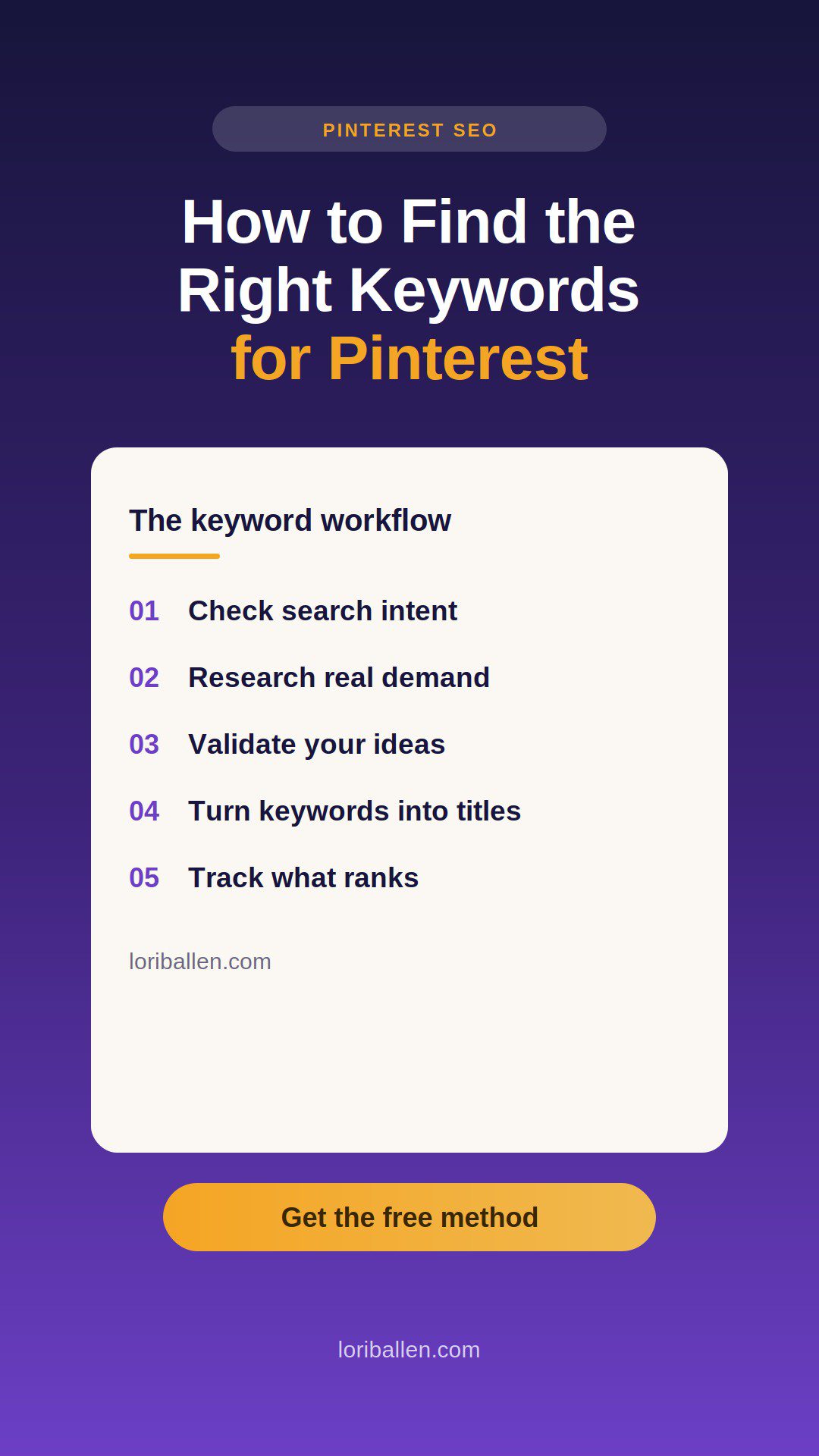
Step 1: Nail Down Pinterest Search Intent (Quickly)

Pinterest isn’t Google. People use Pinterest for two reasons:

  • Buying something (like home decor or fashion)
  • Learning something (like DIY, recipes, or how-to guides)

You have to know immediately which type of content Pinterest prefers for your chosen keyword.

How to Check Intent:

  • Type your keyword into Pinterest.
  • Quickly scan the top pins:
    • Product links (Amazon, boutiques) = Buying Intent
    • Blog posts/tutorials = Informational Intent

Real-world Example:
If you type “boho jackets,” Pinterest spits out product pins—people want to shop, not read. If you type “linen closet organization,” you get mostly blogs—people want tips and tutorials. Boom—intent clarified.

Step 2: Meet Your New Favorite Tool: PinClicks

Manual keyword research wastes valuable time. PinClicks fixes this by giving you Pinterest keyword ideas fast, clean, and data-backed.

Why You’ll Love PinClicks:

  • Instantly see keyword popularity
  • View related keyword suggestions
  • Check competitor rankings easily
  • Track your Pinterest ranking over time

Use PinClicks to eliminate guesswork. (Affiliate Disclosure: I earn a commission at no extra cost to you.)

PinClicks - Pinterest Research Tool for Creators

Transform your Pinterest presence by discovering top pins' high-performing stats and keywords. Say goodbye to guesswork and hello to skyrocketing traffic and saves. Start with a Free Account today!

PinClicks - Pinterest Research Tool for Creators
Check Out Pinclicks
We earn a commission if you make a purchase, at no additional cost to you.

Step 3: Quickly Find Keywords Using PinClicks

Let’s say your blog is about home organization. Here’s the drill:

  • Open PinClicks and navigate to the “Keyword Research” tab.
  • Type “home organization” into the search bar.
  • Sort results by highest popularity first.

Instantly, you’ll see keywords like:

  • Home organization for small spaces
  • Nursery organization ideas
  • Home organization categories (who knew?)

The takeaway:
In minutes, you’ve got at least 20 clear blog topics proven to perform on Pinterest—no guessing required.

Step 4: Validate Your Keyword Ideas (The Smart Way)

Not every popular keyword means a blog opportunity. Use PinClicks to verify before you write a single word.

How to Quickly Validate:

  • Pick a keyword in PinClicks and click “See Top Pins.”
  • Sort pins by “Saves” to see top-performing content.
  • Hover and check if they’re blogs or product pins.

If most pins lead to Amazon or shopping pages, skip the blog. If they’re blogs, you’ve got a winner.

Example:
“Linen closet organization” is mostly blogs—perfect. “Boho jackets” leads straight to products—not ideal.

Step 5: Instantly Generate Blog Titles with ChatGPT + Harpa

Keyword research meets AI—your secret weapon for rapid content creation.

Here’s the quick how-to:

  • Use Harpa Chrome Extension to easily integrate ChatGPT with PinClicks.
  • Prompt ChatGPT to create a table of:
    • Target keyword
    • Title idea (make it a listicle or how-to)
    • Excerpt (to jumpstart your content)

In seconds, your blog topics are ready to roll.

Runs ChatGPT Prompts in your Browswer
Harpa

This Chrome extension isn't just tech—it’s your sidekick in getting things done. With its sharp, page-aware smarts, HARPA AI knows how to tailor ChatGPT prompts to whatever web page you're on. We're talking about cutting right to the chase, skipping the fluff, and getting exactly what you need without the runaround.

Got a go-to prompt? Save it. Use it. Automate those repetitive nightmares into quick and clean actions. Whether you're hammering out emails or mining articles for gold, HARPA AI cuts out the busywork and lets you focus on what truly matters.

Harpa
Check Out Harpa
We earn a commission if you make a purchase, at no additional cost to you.

Step 6: Automate Your Entire Workflow (and Never Look Back)

My favorite strategy: automate the busywork so you can scale faster. Here’s how:

  • Take the ChatGPT-generated table of blog topics and paste them into Airtable or Google Sheets.
  • Set up automation (MAKE or another workflow tool) to:
    • Generate full blog posts using ChatGPT.
    • Create AI-generated images.
    • Auto-publish to WordPress.
    • Pin directly to Pinterest automatically.

This approach lets you publish high-quality content at scale, hands-free.

Want my exact blueprint? Check out my Ballen Blueprint Coaching Program. I teach all of this step-by-step, no fluff, no theory—just actionable results.

Blog Automation
Make

Make is your automation command center. It connects all your apps and systems—then runs the tedious stuff for you, on autopilot. Think: drag, drop, done. No code. No bottlenecks. No limits.


You design powerful workflows (called scenarios) with a visual builder that feels more like playing with Lego than configuring software. Whether you're syncing data between Airtable and Google Sheets, auto-posting to Instagram, or sending personalized emails from new Typeform entries—Make handles it all, 24/7.

Make
Buy Now
We earn a commission if you make a purchase, at no additional cost to you.

Step 7: Track Your Results and Double Down on Winners

Publishing without tracking is flying blind. PinClicks has built-in rank tracking, so use it:

  • Navigate to Rank Tracker in PinClicks.
  • Add keywords to monitor how they perform.
  • Quickly identify your best-performing content to optimize and replicate.

Seeing what’s ranking means you instantly know where to put your energy—no guessing, no wasting time.

PinClicks - Pinterest Research Tool for Creators

Transform your Pinterest presence by discovering top pins' high-performing stats and keywords. Say goodbye to guesswork and hello to skyrocketing traffic and saves. Start with a Free Account today!

PinClicks - Pinterest Research Tool for Creators
Check Out Pinclicks
We earn a commission if you make a purchase, at no additional cost to you.

Step 8: Spy on Competitors and Win

PinClicks lets you ethically spy on your competitors’ keyword strategies, giving you their proven roadmap.

Here’s how easy it is:

  • Find a competitor on Pinterest (check their follower count for credibility).
  • Enter their Pinterest username into PinClicks Account Explorer.
  • See exactly which keywords they’re ranking for and target them strategically.

Instantly, you’ve uncovered proven topics your audience loves—without wasting hours experimenting.

Wrap-Up: Pinterest Keyword Research Made Easy (and Fast)

Pinterest keyword research doesn’t need to take hours. Using PinClicks, ChatGPT, and automation, you’ll easily find keywords that drive massive traffic and monetize fast. Forget manual research, complicated spreadsheets, and guesswork.

Want to take this even further? Join my Ballen Blueprint Coaching Program, and I’ll show you exactly how to scale your Pinterest traffic and profits using real-world strategies that work.

Ready? Get out there, grab your keywords, automate your content, and dominate Pinterest—starting today.

Tags: harpapinclicksPinterest
Previous Post

How I Automated My Blog (So It Practically Runs Without Me)

Next Post

5 Urgent Lessons for Amazon Influencers (What I Learned in Year 1)

Lori Ballen

Lori Ballen

I'm a full-time blogger. I teach entrepreneurs how to get more website traffic, generate leads, and make more money online. This website contains affiliate links that benefit me. Take a Course Get a Website Try my Tools

Related Posts

The Facebook Image Post Strategy That Earns $100/Day (No Videos, No Face Required)
Social Media Strategies

The Facebook Image Post Strategy That Earns $100/Day (No Videos, No Face Required)

November 18, 2025

Learn how creators are earning $100 a day on Facebook using simple image posts — no videos, no face, no fancy gear required. This guide walks through the full process using ChatGPT, Canva, and Post Planner to create, schedule,...

How to Make Money on Pinterest Without Followers
Social Media Strategies

How to Make Money on Pinterest Without Followers

November 17, 2025

Want to make money on Pinterest without needing a huge following or spending hours posting? This guide shows you exactly how to generate traffic and sales for your digital products using Pinterest’s powerful features, all without showing your face...

If You’re Posting on Pinterest, and Not Making Money, Do this.
Social Media Strategies

If You’re Posting on Pinterest, and Not Making Money, Do this.

October 2, 2025

Posting nonstop on Pinterest won’t make you money unless every pin leads to a clear conversion path. Here’s how to design keyword-driven pins that send clicks to content that actually sells—affiliate products, digital downloads, and more.

7 Pinterest Secrets I Wish I Knew Sooner
Social Media Strategies

7 Pinterest Secrets I Wish I Knew Sooner

September 29, 2025

Pinterest is a powerhouse, but it’s easy to miss the little tricks that make all the difference. Here are the secrets I wish I had known sooner that can take your Pinterest game from okay to incredible.

Next Post
5 Urgent Lessons for Amazon Influencers (What I Learned in Year 1)

5 Urgent Lessons for Amazon Influencers (What I Learned in Year 1)

Leave a Reply

Your email address will not be published. Required fields are marked *

This site uses Akismet to reduce spam. Learn how your comment data is processed.

About Me

Lori Ballen

Lori Ballen

Content Creator

Welcome! I'm Lori Ballen—digital entrepreneur, affiliate marketing expert, and creator of content that keeps earning long after it's published. I teach creators and bloggers how to turn videos, blogs, and automation into scalable income streams with freedom at the core. Here you’ll find tips, tools, and real talk on building a content-driven business that works for you.

Search This Website

No Result
View All Result

Categories

  • Affiliate Marketing Strategies (46)
  • Blogging Strategies (227)
  • Branding Strategies (1)
  • Content Marketing (4)
  • Digital Marketing (1)
  • Digital Products (11)
  • Make Money with Youtube (2)
  • Marketing Tools and Resources (2)
  • Mindset and Motivation (3)
  • Print on Demand (2)
  • Side Hustles (39)
  • Social Media Strategies (22)
  • Travel (9)
  • Work From Home Strategies (2)
  • Youtube Channel (7)

Popular

  • websites like omegle

    15 Best Get Paid to Chat Apps

    1736 shares
    Share 666 Tweet 416
  • ChatGPT Prompts: The Ultimate Resource for Bloggers, Writers, and Content Creators

    2397 shares
    Share 433 Tweet 271
  • How to Delete a Pin from Pinterest [Step by Step Tutorial]

    8867 shares
    Share 384 Tweet 240
  • The Ultimate Guide to Affiliate Marketing Strategy on Instagram: A Beginner’s Blueprint

    756 shares
    Share 298 Tweet 186
  • 10 Hidden Expenses Draining Your Wallet (And How to Stop Them)

    675 shares
    Share 270 Tweet 169
Avoid the pitfalls of affiliate marketing with these 10 common mistakes and learn how to fix them. Boost your income by refining your strategy and building long-term success.
Affiliate Marketing Strategies

I Made These 10 Affiliate Mistakes — Here’s What Finally Made Me Money

by Lori Ballen
December 2, 2025
0

Learn from my affiliate marketing mistakes and discover what actually leads to consistent income. I’m breaking down 10 common pitfalls...

Read moreDetails
I Stopped Following Marketing Rules — And Built a Digital Marketing Business That Works

I Stopped Following Marketing Rules — And Built a Digital Marketing Business That Works

December 2, 2025
How To Make Money on YouTube Without Ads

How To Make Money on YouTube Without Ads

December 2, 2025
How Much Can You Really Make as an Amazon Influencer? Real Numbers from Real Creators

How Much Can You Really Make as an Amazon Influencer? Real Numbers from Real Creators

November 27, 2025
This Simple Pinterest Fix Brought Back 20K Views Overnight

This Simple Pinterest Fix Brought Back 20K Views Overnight

December 2, 2025

Instagram

  • When a cat claims his territory, it’s his. Even if it’s while you’re making the bed.
  • Next goal is to put the next height on this step. This was the first time I could finish her whole workout 😂 I need a bigger TV in here
  • Comment LINK to see all of my guides. I am a full-time content creator earning multiple six figures per year. This is what I do, and this is what I teach.

Digital marketing opens doors. Success brings challenges—self-doubt, imposter syndrome. Embrace the journey and keep learning. #DigitalMarketing #MarketingTips #OnlineBusiness #EntrepreneurLife #ImposterSyndrome #MotivationDaily #ReelsOfInstagram
  • Ordering the deluxe package just to be safe. #blessednotstressed #holidays #travelblogger
  • I built my multiple six figure digital marketing business one step at a time. I learned how to blog when AOL said you’ve got mail. I learned YouTube, Pinterest, TikTok, Instagram, building courses, writing books and more all by listening to interviews, podcast, YouTube videos, audiobooks, and more.

The secret is not trying to learn everything at once.  I look for one take away that I can go implement immediately and then I’m done with the audio.

And whenever I’m ready for what’s next, it always shows up . Today we can think the algorithms and the for you pages for that.
  • I had to learn to take breaks. 16 years ago when I used to smoke, breaks just happened naturally all day long. After i quit, I just became a work horse. Hours and hours without breaking up the computer. It wasn’t easy at first. But now I very much enjoy taking a break to read a chapter or two of a book whenever the moment calls. And then I get up and do another round on the computer, or take a walk, or head into the gym.
  • I thoroughly enjoyed standing on my cruise balcony, recording the sunset. It was actually the only sunset of the week because of the clouds and I happen to be on my balcony when it’s started. Imagine that!!
  • Comment guide to see how I make a living with content. Instagram has new analytics. The type of analytics that we need to see more of. And tell us exactly what we did right, what to add, and what to create more of. I am a multi six-figure content creator, and I still love analytics at a glance like this!! I never gave insta the attention it deserves. I am an old school blogger, and YouTuber. But Instagram might be the most powerful of all. If it’s done right. #content #contentmarketing #instagram
  • I used to dream about 
moments like this—on a ship, 
watching the sunset from my 
balcony. But first, I had to get 
comfortable traveling solo. I 
did, and now I’m free!!! #cruise #solo #solotravel

Welcome Back!

Login to your account below

Forgotten Password?

Retrieve your password

Please enter your username or email address to reset your password.

Log In
No Result
View All Result
  • About
    • Affiliate Disclosure
    • Ballen Academy
    • Contact Us
    • Privacy Policy
    • Youtube
  • Loris Tools
  • Lori Ballen’s Blog
    • Affiliate Marketing Strategies
    • Blogging Strategies
    • Branding Strategies
    • Digital Products
    • Financial Freedom
    • Marketing Tools and Resources

© 2025 Lori Ballen