Clicky

  • About
    • Affiliate Disclosure
    • Ballen Academy
    • Contact Us
    • Privacy Policy
    • Youtube
  • Loris Tools
  • Lori Ballen’s Blog
    • Affiliate Marketing Strategies
    • Blogging Strategies
    • Branding Strategies
    • Digital Products
    • Financial Freedom
    • Marketing Tools and Resources
Saturday, November 8, 2025
  • Login
❤️ Lori Ballen
No Result
View All Result
Ballen Blueprint Coaching
eBooks
Get a Website
  • About
    • Affiliate Disclosure
    • Ballen Academy
    • Contact Us
    • Privacy Policy
    • Youtube
  • Loris Tools
  • Lori Ballen’s Blog
    • Affiliate Marketing Strategies
    • Blogging Strategies
    • Branding Strategies
    • Digital Products
    • Financial Freedom
    • Marketing Tools and Resources
Ballen Blueprint Coaching
eBooks
Get a Website
No Result
View All Result
❤️ Lori Ballen
No Result
View All Result
Home Blogging Strategies
This Simple Tailwind Trick Will Make Your Pinterest Strategy 10x Better!

This Simple Tailwind Trick Will Make Your Pinterest Strategy 10x Better!

in Blogging Strategies
Reading Time: 7 mins read
Share on FacebookShare on Twitter

This website contains affiliate links. Some products are gifted by the brand. As an Amazon Associate, I earn from qualifying purchases. The content on this website was created with the help of AI.

While I share money-making strategies, nothing is "typical", and outcomes are based on each individual. There are no guarantees.

Imagine effortlessly scheduling your Pinterest pins, keeping your boards fresh, and driving continuous traffic to your blog—all while you sleep, travel, or work on other projects. What if there was a way to automate your pinning strategy without triggering spam filters? That’s exactly what we’re diving into today!

Why I Chose This Topic

Pinterest is a powerhouse for bloggers, influencers, and business owners. However, navigating its algorithm can be tricky, especially when it comes to avoiding spam filters. I chose this topic because my readers—content creators and business owners—are always looking for smarter ways to grow their reach without spending endless hours on manual tasks. Tailwind provides a solution that maximizes efficiency while keeping content fresh and engaging.

What You’ll Learn

By the end of this guide, you’ll understand how to:

  • Efficiently schedule multiple pins to multiple boards using Tailwind.
  • Use intervals to avoid spam filters and keep content circulating.
  • Leverage AI-generated images to create fresh pins.
  • Optimize Pinterest SEO with effective descriptions.
  • Save time while increasing traffic and engagement.

Key Takeaways

  • Tailwind’s bulk scheduling tool allows multiple pins to be assigned to different boards.
  • Using intervals strategically helps avoid spam filters and ensures long-term traffic growth.
  • AI tools can generate fresh images instead of reusing old pins.
  • Tailwind’s Chrome extension simplifies the entire scheduling process.

Understanding the Concept

Pinterest rewards fresh content. Previously, creators could repin the same image across multiple boards rapidly. Today, the best strategy is to use unique images, interval scheduling, and strategic pinning to maintain visibility and avoid being flagged as spam.

Tailwind’s scheduling tools make it easy to:

  1. Upload multiple pins at once.
  2. Assign them to different boards.
  3. Set up strategic intervals.
  4. Create new images to keep content fresh.

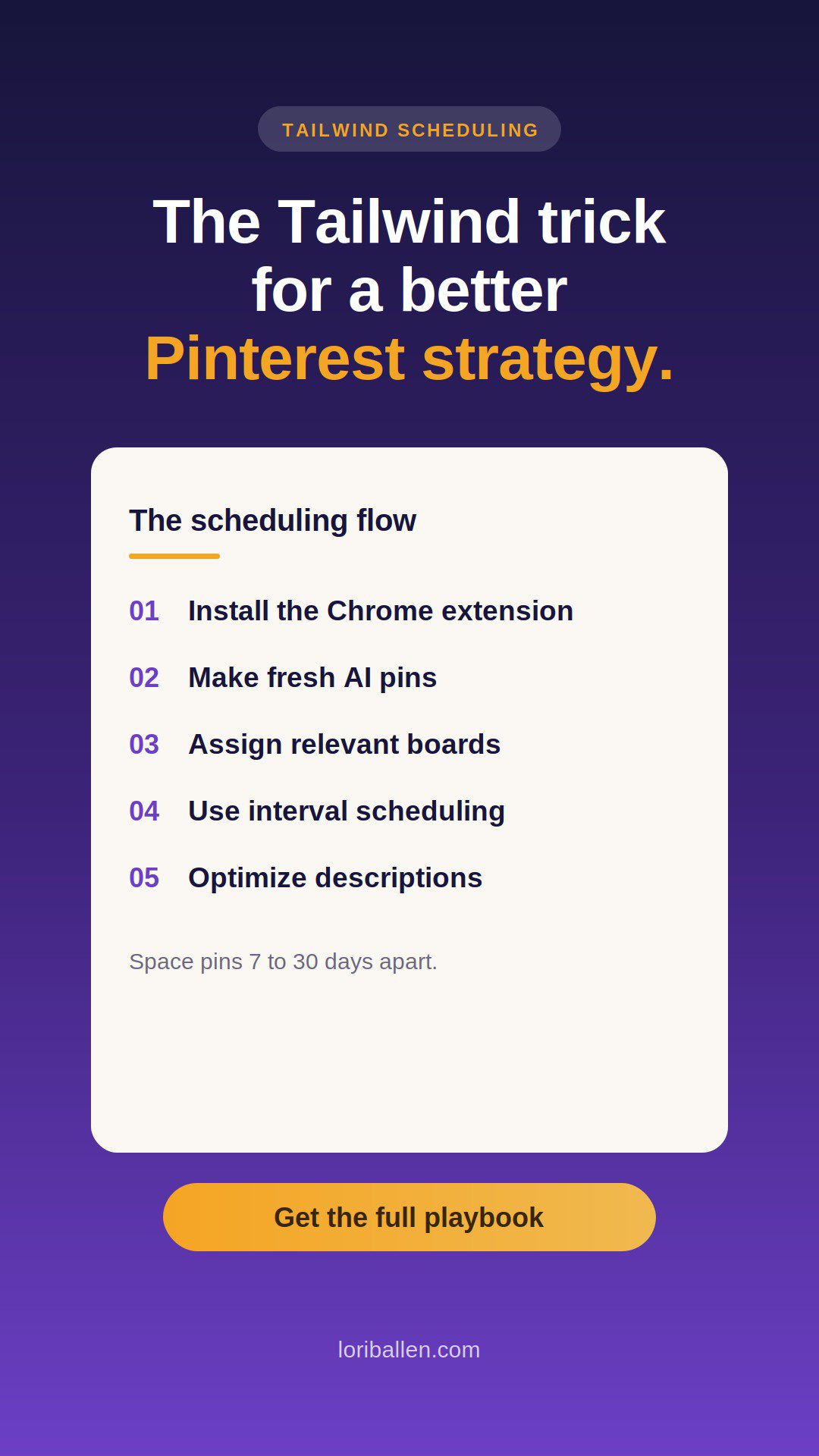
Tailwind Scheduling Process: Two-Column Guide

StepDescription
1. Install Tailwind’s Chrome ExtensionDownload the extension to easily select and schedule pins from your browser.
2. Create Your Blog Post & AI ImagesUse AI tools to generate fresh pin images instead of reusing the same ones.
3. Select Pins for SchedulingClick the Tailwind Chrome extension and choose the images you want to schedule.
4. Assign BoardsSelect boards relevant to your pins and avoid spam triggers.
5. Use Interval SchedulingSpread pins over time to keep boards fresh without overwhelming your followers.
6. Optimize Pin DescriptionsUse AI-generated Pinterest titles and descriptions for SEO-friendly captions.
7. Schedule & MonitorLet Tailwind handle the scheduling while you track performance.

Step-by-Step Guide to Scheduling Pinterest Pins with Tailwind

1. Install Tailwind’s Chrome Extension

  • Go to the Tailwind website and sign up.
  • Download the Chrome extension to enable quick scheduling.

2. Create Your Blog Post & AI Images

  • Write a blog post optimized for Pinterest.
  • Use AI tools (like Ideogram) to generate fresh, unique images.

3. Select Pins for Scheduling

  • Click the Tailwind Chrome extension.
  • Select multiple images related to your blog post.

4. Assign Boards

  • Choose boards relevant to each pin.
  • Avoid selecting too many boards for the same pin to prevent spam triggers.

5. Use Interval Scheduling

  • Click the “Use Interval” button.
  • Set the first pin date to ensure it doesn’t overlap with recent pins.
  • Space pins at least 7-30 days apart to keep them fresh.

6. Optimize Pin Descriptions

  • Use an AI tool to generate Pinterest-friendly descriptions.
  • Add relevant keywords for searchability.

7. Schedule & Monitor

  • Click Schedule and let Tailwind handle the rest.
  • Monitor engagement and adjust intervals as needed.

Resources You Need

  • Tailwind Chrome Extension – For seamless scheduling.
  • AI Image Generators – Ideogram, Canva, or Midjourney for fresh pin visuals.
  • Pinterest SEO Tools – Pinterest Trends & Keywords for optimal descriptions.

Frequently Asked Questions

1. Is Tailwind necessary for Pinterest growth?

No, but it dramatically improves efficiency by automating your scheduling, keeping your content fresh without manual pinning.

2. How often should I pin?

A good rule of thumb is one fresh pin per day per URL, spaced 7-30 days apart if repinning to another board.

3. Can I pin the same image multiple times?

It’s best to create fresh images instead of pinning the same one repeatedly.

4. Will using Tailwind get me banned from Pinterest?

No, as long as you follow best practices (avoiding spam, using unique images, and scheduling strategically).

5. How can I get more engagement on Pinterest?

  • Use high-quality, eye-catching images.
  • Optimize your pin titles and descriptions with keywords.
  • Engage with other pinners in your niche.

About Lori Ballen

Lori Ballen is a content creator, entrepreneur, and digital marketing expert with years of experience in SEO, blogging, and Pinterest growth strategies. She helps businesses and bloggers scale their online presence using smart automation and AI-driven content strategies.

Try Tailwind.

Previous Post

Beach Vibes Only

Next Post

My Personal Reading List

Lori Ballen

Lori Ballen

I'm a full-time blogger. I teach entrepreneurs how to get more website traffic, generate leads, and make more money online. This website contains affiliate links that benefit me. Take a Course Get a Website Try my Tools

Related Posts

How ChatGPT Makes Pinterest Growth EASY For Beginners
Blogging Strategies

How ChatGPT Makes Pinterest Growth EASY For Beginners

November 6, 2025

Imagine waking up to find your Pinterest account taking off — your DIY projects showing up everywhere, your boards growing, your content driving traffic back to your blog. That’s exactly what happens when you stop guessing and start reverse-engineering...

How to Schedule Pins on Pinterest: I Batched 90 in One Afternoon
Blogging Strategies

How to Schedule Pins on Pinterest: I Batched 90 in One Afternoon

November 4, 2025

If you’re still pinning one image at a time, you’re wasting hours every month. I batch 90 Pinterest pins in about four hours — an entire month of content in one sitting. The key is having a repeatable system...

How to Bulk Schedule Pinterest Pins Using Tailwind and Ideogram
Blogging Strategies

How to Bulk Schedule Pinterest Pins Using Tailwind and Ideogram

November 1, 2025

If you're looking to streamline your Pinterest strategy and schedule content months in advance, I’ve got an easy method that’s worked wonders for me. The best part? It’s super fast once you get the hang of it. I’ve been...

How to Make More as an Amazon Influencer
Blogging Strategies

How to Make More as an Amazon Influencer

October 22, 2025

How to Find High-Commission Amazon Products Using Creator Connections Most Amazon Influencers earn between 2–4% on commissions, but top creators are quietly pulling in 10–30% — often on the same products. The secret? They’re using Amazon’s Creator Connections program...

Next Post
travel1

My Personal Reading List

Leave a Reply

Your email address will not be published. Required fields are marked *

This site uses Akismet to reduce spam. Learn how your comment data is processed.

About Me

Lori Ballen

Lori Ballen

Content Creator

Welcome! I'm Lori Ballen—digital entrepreneur, affiliate marketing expert, and creator of content that keeps earning long after it's published. I teach creators and bloggers how to turn videos, blogs, and automation into scalable income streams with freedom at the core. Here you’ll find tips, tools, and real talk on building a content-driven business that works for you.

Search This Website

No Result
View All Result

Categories

  • Affiliate Marketing Strategies (42)
  • Blogging Strategies (216)
  • Content Marketing (2)
  • Digital Products (10)
  • Make Money with Youtube (2)
  • Marketing Tools and Resources (2)
  • Mindset and Motivation (3)
  • Print on Demand (2)
  • Side Hustles (35)
  • Social Media Strategies (20)
  • Travel (9)
  • Work From Home Strategies (2)
  • Youtube Channel (6)

Popular

  • websites like omegle

    15 Best Get Paid to Chat Apps

    1632 shares
    Share 625 Tweet 391
  • ChatGPT Prompts: The Ultimate Resource for Bloggers, Writers, and Content Creators

    2347 shares
    Share 416 Tweet 260
  • How to Delete a Pin from Pinterest [Step by Step Tutorial]

    8831 shares
    Share 368 Tweet 230
  • The Ultimate Guide to Affiliate Marketing Strategy on Instagram: A Beginner’s Blueprint

    687 shares
    Share 273 Tweet 171
  • 10 Hidden Expenses Draining Your Wallet (And How to Stop Them)

    656 shares
    Share 262 Tweet 164
How ChatGPT Makes Pinterest Growth EASY For Beginners
Blogging Strategies

How ChatGPT Makes Pinterest Growth EASY For Beginners

by Lori Ballen
November 6, 2025
0

Imagine waking up to find your Pinterest account taking off — your DIY projects showing up everywhere, your boards growing,...

Read moreDetails
How to Schedule Pins on Pinterest: I Batched 90 in One Afternoon

How to Schedule Pins on Pinterest: I Batched 90 in One Afternoon

November 4, 2025
The Harsh Truth About Making Money Online (What I Learned After $300K)

The Harsh Truth About Making Money Online (What I Learned After $300K)

November 4, 2025
How I Used ChatGPT to Make $15,000 on YouTube

How I Used ChatGPT to Make $15,000 on YouTube

November 4, 2025
How I Use ChatGPT to Create Affiliate Blogs

How I Use ChatGPT to Create Affiliate Blogs

November 1, 2025

Instagram

  • LANDED in Ft. lauderdale!! Solo cruise #2. Damn, I’m proud of myself!! If you only knew how much I had to grow to become OK with solo vacations. That said, I’m about to meet 1000 fellow GenXers!!! Bet I wont be alone long! (P.S. - I spotted a cute one 😉)
  • 2 hours left out of the seven hour flight!! I happened to sit next to an interpreter for the deaf!! Nice young man who cruises for a living as a sign language interpreter. At 17, I was the youngest certified interpreter for the deaf, but only worked in that field for a couple of years. I was self taught. But I got married, and that was that. So fun to share our stories today.
  • I made $15,432.51 in one month with affiliate marketing — no employees, no ad spend, just strategy. I built this system once, and now it pays me every single month. Comment GUIDES and I’ll send you my digital marketing guides that show exactly how I do it step-by-step.
  • Wheels up! #solo #cruise
  • Instead of Wendy’s at the airport, and airplane snacks, I loaded up on healthy options! Greek yogurt, turkey sandwich, chicken salad, cheese plate, milk. This is how I hit those protein goals on a seven hour flight!! ♥️
  • If you are traveling and checking bags, add an hour!!!!!
  • I get such a kick out of seeing my house on my security cameras, especially when there’s a cat in view!! ♥️
  • Let’s go girls!! Put on those sneakers and take the walk! You’ll be glad you did!
  • Went on vacation solo — and digital marketing paid for it.

No clients, no launches, no pressure. Just income from systems I built once that keep working.

If you’ve ever wanted to do the same, grab my e-book that breaks down exactly how I do it.

Comment PAID and I’ll DM you the link.

Welcome Back!

Login to your account below

Forgotten Password?

Retrieve your password

Please enter your username or email address to reset your password.

Log In
No Result
View All Result
  • About
    • Affiliate Disclosure
    • Ballen Academy
    • Contact Us
    • Privacy Policy
    • Youtube
  • Loris Tools
  • Lori Ballen’s Blog
    • Affiliate Marketing Strategies
    • Blogging Strategies
    • Branding Strategies
    • Digital Products
    • Financial Freedom
    • Marketing Tools and Resources

© 2025 Lori Ballen