Most people set up Pinterest boards the way they’d organize a mood board.
Broad categories. Vague names. A little bit of everything.
“Ideas I Love.” “Things to Try.” “Lifestyle.”
Those boards do nothing for affiliate income. Nothing. They don’t rank in Pinterest search, they don’t attract a specific audience, and they give Pinterest zero signal about what your content is actually about.
The boards that drive affiliate commissions look completely different. Here’s how to build them.
Why Your Board Strategy Is a Monetization Decision
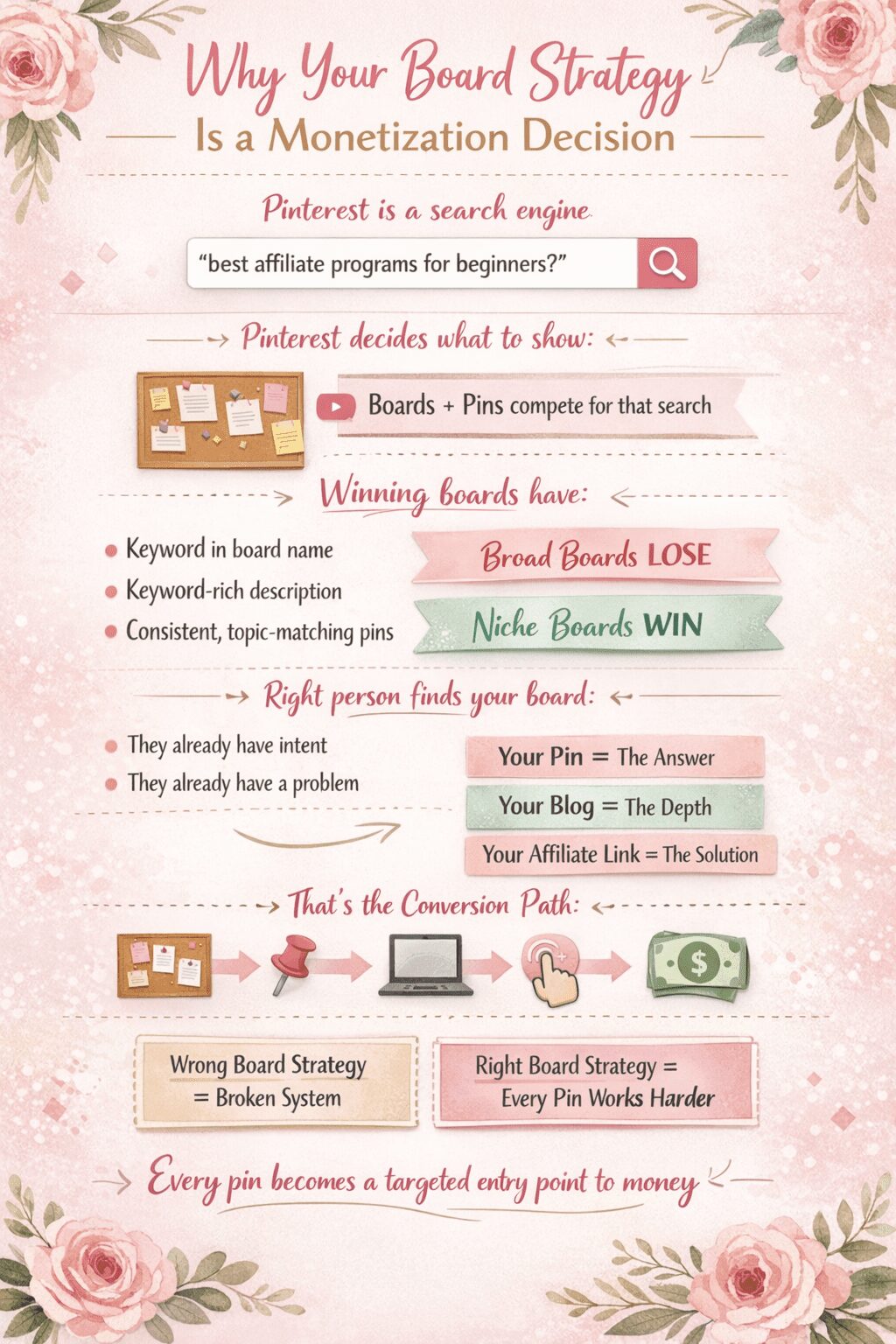
Pinterest is a search engine.
When someone types “best affiliate programs for beginners” into Pinterest, the algorithm is deciding which boards and pins to surface. The boards that win that search have that keyword in the board name, a keyword-rich board description, and consistent pins that match the topic.
Broad boards don’t win those searches. Niche boards do.
And when the right person finds a niche board, they’re already in the mindset to act. They searched for something specific because they have a specific problem. Your pin answers that problem. Your blog post goes deeper. Your affiliate link solves it.
That’s the conversion path. The board is the first step.
Get your board strategy wrong and the rest of the system breaks. Get it right and every pin you add to that board has a higher chance of finding the exact person who will click your affiliate link.
What Makes a Board “Niche Enough”
There’s a line between too broad and too narrow.
“Money” is too broad. Nobody searches “money” on Pinterest with buying intent.
“How to make money selling printables on Etsy for beginners” is too narrow. You’ll never add enough pins to keep that board active.
The sweet spot is one level below the obvious category — specific enough that the searcher knows exactly what they’ll find, broad enough that you can consistently add content.
Here are examples of the difference:
| Too Broad | Niche Sweet Spot |
|---|---|
| Pinterest Tips | Pinterest Marketing for Bloggers |
| Make Money Online | Affiliate Marketing for Beginners |
| Amazon | Amazon Influencer Program |
| Side Hustles | Passive Income Digital Products |
| Blogging | Blog Traffic Strategies |
| Email Marketing | Email List Building for Bloggers |
Every board in the right column has search volume. Every board in the right column has a clear affiliate angle. Every board in the right column attracts a person with a specific problem you can help solve.
How to Find Your Niche Boards: The Research Process
Don’t guess. Research.
Step 1: Start with your affiliate programs.
List every affiliate program you’re in or plan to join. For each one, ask: who is the person most likely to buy this product, and what are they searching for on Pinterest?
If you promote an email marketing platform, your buyer is someone searching “how to build an email list,” “email marketing for bloggers,” or “email list building tips.” Those are your board topics — not “email marketing” as a broad category.
Step 2: Type those phrases into Pinterest search.
Look at what auto-completes. Pinterest’s search suggestions are real data. They show you what people are actually typing. If “affiliate marketing for beginners” auto-completes to “affiliate marketing for beginners without a blog” and “affiliate marketing for beginners on Pinterest,” those are sub-niches worth building boards around.
Step 3: Look at what’s already performing.
Search your keyword. Sort by “popular.” Look at which boards the top-performing pins are saved to. Those board names tell you what’s working. You’re not copying — you’re learning what Pinterest already rewards.
Step 4: Use Pinclicks to validate.
Pinclicks shows you search volume and competition data for Pinterest keywords. Before you commit to a board name, confirm there’s actual search traffic behind it. A board nobody searches for is a board that works for nobody.
How to Name Your Boards for Search
The board name is a keyword field. Treat it like one.
Your board name should be the exact phrase — or close to it — that your target reader types into Pinterest search.
Not “Affiliate Stuff.” Not “My Fave Marketing Tips.”
“Affiliate Marketing for Beginners.” “Pinterest Affiliate Marketing.” “How to Make Money Blogging.”
Use natural language, not creative language. Pinterest users type the way people talk, not the way marketers brand things.
One more rule: don’t put your name or your brand in your board names unless you’re already a household name in your niche. “Lori’s Pinterest Tips” doesn’t rank. “Pinterest Marketing Tips for Bloggers” does.
How to Write Board Descriptions That Pull Traffic
Most people leave board descriptions blank.
That’s leaving keyword real estate on the table.
A board description has two jobs: tell Pinterest what the board is about, and tell the human reader what they’ll find there. Both in plain language. Both with keywords woven in naturally.
Here’s the formula:
[What the board contains] + [who it’s for] + [what they’ll get from it] + [2 to 3 keyword phrases]
Example for an affiliate marketing board:
“Affiliate marketing tips, strategies, and income ideas for bloggers and content creators. Learn how to make money with affiliate links, find the best affiliate programs for beginners, and build passive income through content. Pinterest affiliate marketing | affiliate income strategies | best affiliate programs 2026”
That description is doing work. It tells Pinterest what the board covers. It speaks directly to the reader who lands on it. And it contains the exact phrases people are searching.
Write one for every board. Every single board. Even your older boards that have been sitting there with no description.
Matching Pins to Boards: The Affiliate Conversion Logic
Here’s where most people get the strategy backwards.
They create a board and then figure out what to pin to it.
You need to work the other direction. Start with the affiliate product. Then build the board ecosystem around it.
Example: You promote a Pinterest scheduling tool.
The buyer for that tool is someone who wants to save time on Pinterest. They’re searching for scheduling strategies, batch pinning methods, best Pinterest tools, Tailwind alternatives.
Build boards around those searches:
- Pinterest Scheduling Tips
- Pinterest Marketing Tools
- Tailwind for Pinterest
- Pinterest Strategy for Bloggers
Every pin on those boards points to content that teaches Pinterest scheduling — with your affiliate link embedded in the blog post.
The board attracts the right searcher. The pin pulls them to your content. The content converts them.
That chain only works when the board, the pin, and the content are all aligned around the same searcher and the same solution.
How Many Boards You Actually Need
Not 200. Not 12.
The number that matters is active boards — boards you’re consistently adding pins to, that have enough content to look authoritative, and that are focused enough to rank for something.
For a monetized Pinterest account, I’d aim for 15 to 25 focused niche boards. Each one should have at minimum 20 to 30 pins before you expect it to perform. Pinterest treats thin boards as low-authority.
Build fewer boards well rather than many boards poorly.
And audit your existing boards. If you have a board called “Random Stuff” or a board on a topic you no longer write about, archive it. Clutter signals to Pinterest that your account isn’t focused. Focused accounts rank better.
Board Covers: The Detail Most People Skip
Your board cover is the first visual impression of your brand on your Pinterest profile.
Generic covers — whatever Pinterest auto-selects from your most recent pin — make your profile look unplanned.
Custom board covers that use your brand colors and a clean text label make your profile look like a resource. Like someone who knows what they’re doing.
Create board covers in Canva. Square format. Consistent color palette. The board name or a one-line descriptor in clean text. Take one hour and do them all at once. Then update them every six months or so when your branding evolves.
It’s a small thing. It compounds.
Group Boards: Still Worth It or Dead?
Group boards had a moment. That moment has mostly passed.
Pinterest has deprioritized group board reach significantly over the past few years. Adding your pins to a 5,000-member group board with mixed niche content signals low relevance — the opposite of what you want.
The exception: small, tightly managed group boards where the topic is very specific and the contributors are few. If you find a group board in your exact niche with active contributors and clear posting rules, it can still move the needle.
But don’t chase them. Don’t spend time requesting access to every group board you find. Your own niche boards, built well, will outperform them.
A Real Board Setup for an Affiliate Marketer
Here’s what a focused board structure looks like for someone monetizing with affiliate marketing and digital products — using my own account as the model:
Core Topic Boards (content you create):
- Pinterest Marketing for Bloggers
- Affiliate Marketing for Beginners
- Amazon Influencer Program
- AI Side Hustles and Digital Products
- Passive Income Strategies
- Email List Building for Bloggers
- Blog Traffic Tips
Income and Business Boards:
- Monthly Income Reports
- Make Money Online
- Wealth Building for Women
Tool-Specific Boards:
- Tailwind for Pinterest
- AI Tools for Content Creators
- Canva Tips for Bloggers
Each board has a clear keyword-based name, a full description, consistent pinning, and content that points to monetized blog posts. The tool-specific boards in particular drive affiliate clicks because the person searching “Tailwind for Pinterest” is already interested in purchasing or trying the tool.
The Pinning Rhythm That Keeps Boards Active
A board that doesn’t get new pins regularly loses authority.
Pinterest rewards freshness. That doesn’t mean pinning 50 things a day — that’s spam behavior and Pinterest will throttle your reach. It means consistent, steady activity.
For each active board, aim for two to four new pins per week. Across 20 boards, that’s 40 to 80 pins weekly — which sounds like a lot until you remember that Tailwind automates the scheduling.
You batch-create your pins, load them into Tailwind, and the tool spreads them out across your boards on a schedule. You’re not logging into Pinterest every day. You’re working in batches once or twice a week.
The boards look active. The algorithm rewards them. The affiliate links inside the blog posts keep earning.
FAQ
Can I pin other people’s content to my boards or only my own?
Both. Mixing in curated third-party content alongside your own pins makes your boards look like genuine resources rather than self-promotion channels. The ratio I use: roughly 80% my own content, 20% curated. Never pin direct competitor content — curate from complementary creators in adjacent topics.
How long before a new board starts driving traffic?
A well-named, well-described board with 30 or more relevant pins typically starts showing up in search within 60 to 90 days. Pinterest is a long game. The boards you build today pay you in six months.
Should I have one board per affiliate program?
Not necessarily. Have one board per search topic. If multiple affiliate products fit the same topic, they all go in the same board. A “Pinterest Marketing Tools” board can have pins leading to posts about Tailwind, Pinclicks, and Canva — three different affiliate programs, one focused board.
What do I do with old boards that aren’t performing?
Check if the board name has any search volume using Pinterest search suggestions or Pinclicks. If it does and the board just needs more content, keep it and add pins. If the board name is too vague or the topic doesn’t align with your current content, archive it. Archived boards don’t delete your pins — they just remove the board from your public profile.
How do I know if my boards are actually driving affiliate clicks?
Check your Pinterest analytics to see which boards are getting the most outbound clicks. Cross-reference with your affiliate dashboard to see if click volume correlates with sales from those timeframes. Boards with high saves but low clicks usually have a pin problem — the content isn’t compelling enough to click through. Boards with high clicks and low saves usually have a board authority problem — not enough content to rank consistently.
The board is not decoration.
It’s infrastructure.
Build it right and every pin you add to it has a better chance of finding the person who’s ready to buy what you’re recommending.
Hey there! Just a quick heads-up: some of the links on this site are affiliate links, meaning I may earn a small commission if you make a purchase (including through the Amazon Associates program), at no extra cost to you. Occasionally, products featured here are gifted by brands.
I also use AI tools to help research and create content for you! While I love sharing strategies to help you succeed, please remember that everyone's journey is unique—individual results vary, and there are no guarantees. Thanks so much for stopping by!


